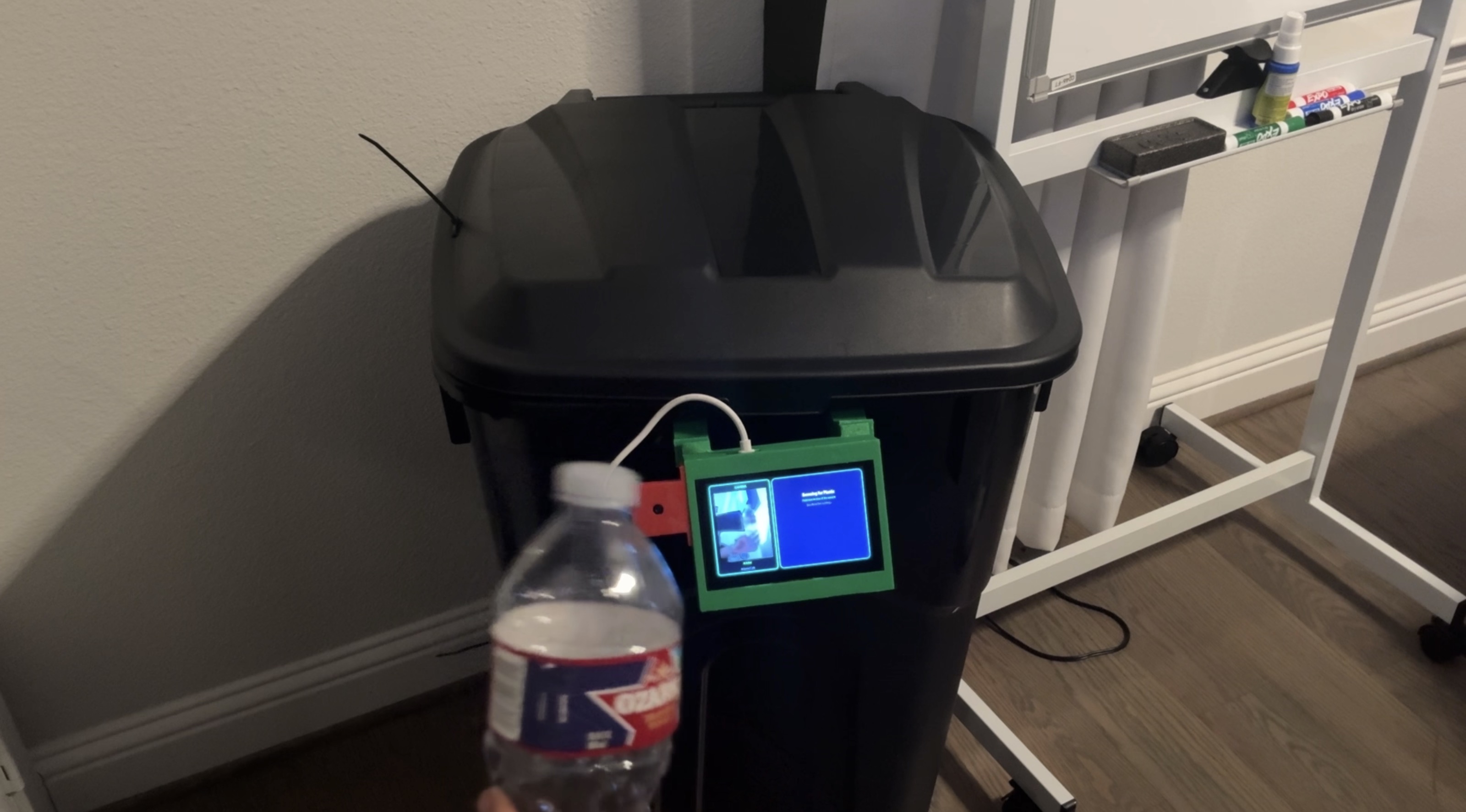
Try the Simulator
Experience the EcoKiosk flow — tap Get Started to begin.
Hello!
Welcome to EcoKiosk
Recycle plastic bottles & earn school reward points!
What's your name?
Type your full name below to earn points.
Scanning Bottle
Scanning bottle...
Deposit Your Bottle
Please deposit your plastic bottle
Congratulations!
You earned a recycling point!
EcoKiosk is an AI-powered recycling station that makes recycling rewarding. A student holds up a plastic bottle to the camera, the AI verifies it's real recyclable material, they type their name on the touchscreen, and they instantly earn school reward points. The whole process takes about 10 seconds. The goal is simple: make recycling feel less like a chore and more like an achievement.
The Problem
It started with a simple observation: students at my school don't recycle. Every lunch period, plastic bottles go straight into the trash. It wasn't apathy — it was indifference. Recycling offered nothing in return. Texas recycles only 23% of its waste, 12 percentage points below the national average. Nationwide, only about 5% of plastic actually gets recycled. The infrastructure exists, but the motivation doesn't.
How It Works
Hold Up Plastic
Student presents a recyclable item to the camera
AI Verifies
YOLOv8 model classifies the plastic type in real-time
Enter Name
Student types their name on the touchscreen
Earn Points
School reward points are instantly awarded
Detectable Plastics
| Resin Code | Name | Examples |
|---|---|---|
| PET (1) | Polyethylene Terephthalate | Water bottles, soda bottles |
| HDPE (2) | High-Density Polyethylene | Milk jugs, detergent bottles |
| PP (5) | Polypropylene | Yogurt containers, bottle caps |
How I Built It
EcoKiosk has three layers: hardware, software, and AI.
Raspberry Pi 5
Main computer running the kiosk application
Pi Camera Module 3
Captures images for real-time AI classification
ELECROW 5" Touchscreen
Displays the interface and accepts user input
3D-Printed Enclosure
Houses all components in a durable, portable shell
Python + PyQt5
Application logic and touchscreen UI
YOLOv8 + OpenCV
Real-time object detection with INT8 quantized weights
Tech Stack
Challenges I Overcame
Inference Speed
Running YOLO on a Raspberry Pi 5 was slower than expected — over 2 seconds per frame initially. I optimized it down to ~400ms:
- Reduced input resolution from 640x640 to 320x320
- Used INT8 quantized weights instead of FP32
- Ran inference on every 3rd frame instead of every frame
Lighting Variability
The model worked in my room but struggled in the school cafeteria — fluorescent lights, sunlight, and shadows created inconsistent conditions.
- Augmented training data with synthetic lighting variations
- Adjusted camera exposure and white balance dynamically
- Added brightness normalization step before inference
False Positives
Early versions triggered on hands, food wrappers, and empty frames.
- Increased confidence threshold from 0.5 to 0.75
- Required detections to persist for at least 1 second
- Restricted valid detections to center 60% of the frame
User Experience
The first version had too many steps. Testing with real students showed they just wanted to tap once and leave. I removed all confirmation dialogs and made the flow fully automatic.
What I Learned
Edge AI Is Different
Deploying on a Raspberry Pi means thinking about memory, power, and speed constraints that don't exist on a laptop. Optimization isn't optional.
UX Is Everything
A technically impressive system that feels slow or confusing won't get used. I spent as much time on the interface as on the AI.
Hardware Debugging Is Humbling
Software errors give stack traces. Hardware errors give silence. I learned to check connections, measure voltages, and trust nothing.
Real Data Beats Assumptions
Testing in my room said the model worked. Testing in the cafeteria said it didn't. I should have tested in real conditions earlier.
What's Next
- Deploy at high schools and measure actual recycling behavior before and after
- Integrate with Minga to automatically distribute school reward points
- Open source the project so other schools can build their own kiosks
- Add a leaderboard to create friendly competition between students
- Expand plastic detection to include more resin types and non-plastic recyclables